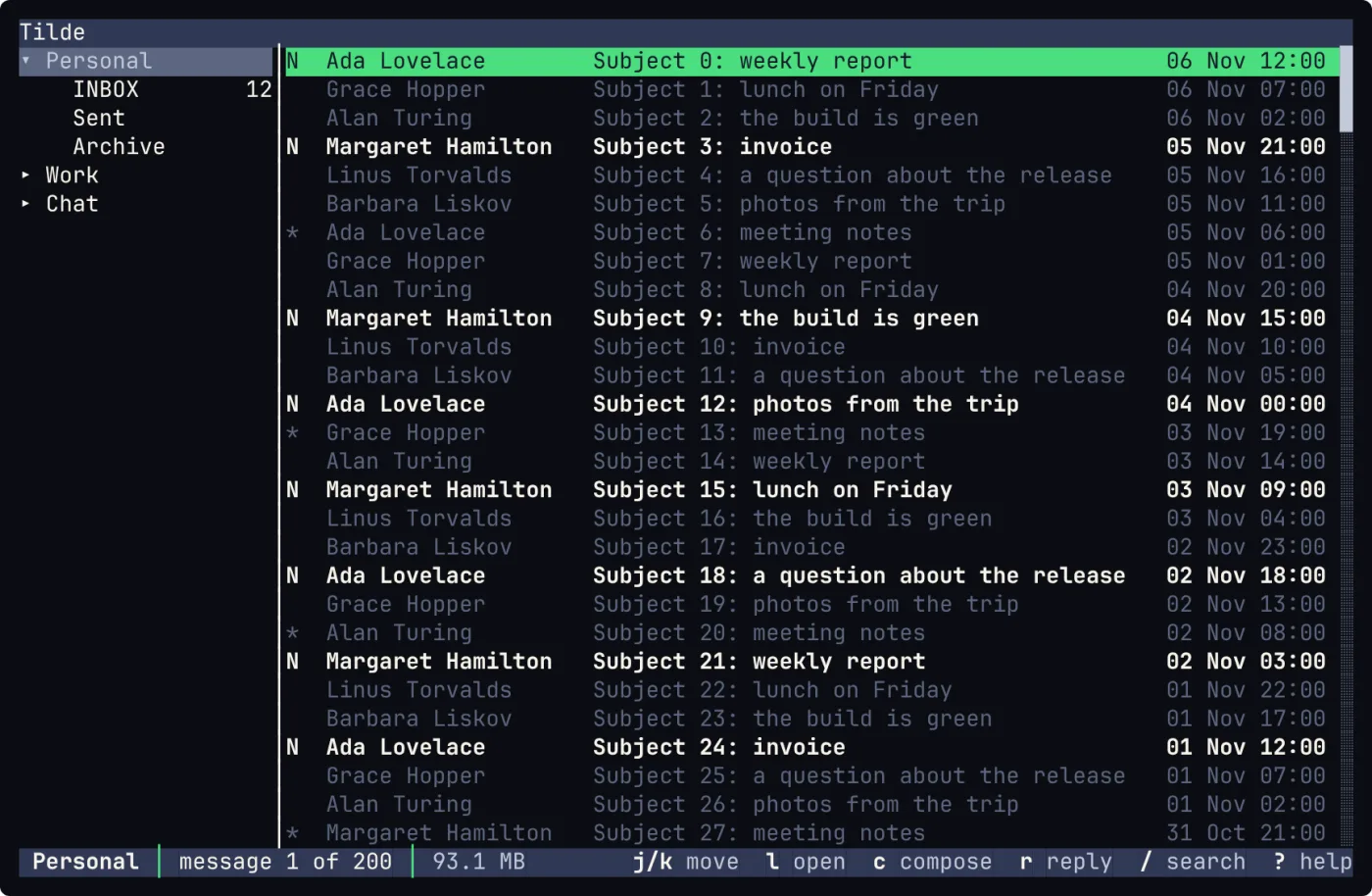
Everything in the pictures of this post is demo data: made-up mail, made-up chat.
Ten days ago I wrote that tmail was my winter project, and I ended with a question: does it make sense to put mail, XMPP and IRC in a single terminal interface?
On 3 November I started again, from an empty solution, and I called it Tilde.
tmail is not gone. It stays on Codeberg at version 0.6.0, where I left it. Tilde is its successor.
Why start again, and not add chat to tmail? Because I tend to want everything to be perfect, repeatable and built as a framework, and I am not sure that is a virtue. I did not want chat bolted on the side of a mail client. I wanted a contract for each kind of thing, a plugin for each protocol, and a core that knows none of them.
The idea
In the tmail post I wrote that I find it scattered to use so many tools for things that belong together: reading, talking to people, getting news, answering. Tilde is my attempt to answer that without building “the application that does everything”.
Its README says it in two lines. Tilde is a framework that connects mail and chat, for clients that live in the terminal. It is strongly inspired by neomutt: small pieces, plain text configuration, no magic.
The word that matters is framework. A client is one thing on top of another thing. Here the pieces below are what I care about, and the client is only the first thing standing on them.
How it is built
Contracts first, plugins second.
Tilde.Abstraction holds only interfaces and the models they share. Reading mail, sending mail and talking in a chat room are three different contracts, and none of them knows what a protocol is:
public interface IMailTransport : IConnection
{
    ValueTask SendAsync(MailDraft draft, CancellationToken cancellationToken = default);
}

public interface IChatClient : IConnection
{
    ValueTask<ChatChannel> JoinAsync(string channelId, CancellationToken cancellationToken = default);
    ValueTask LeaveAsync(string channelId, CancellationToken cancellationToken = default);
    ValueTask SendAsync(string channelId, string text, CancellationToken cancellationToken = default);
    IAsyncEnumerable<IChatEvent> ReadEventsAsync(CancellationToken cancellationToken = default);
    // ...and a few more
}
IMailStore is the one that reads: folders, messages, raw messages. Reading and sending are separate on purpose, and both can be wrapped in middleware, so a cache or a signature can sit in between without the plugin knowing.
Then each protocol is a plugin that implements a contract and registers itself. The core, which owns accounts, configuration, an event bus and the plugin loader, never depends on a plugin. Today there are plugins for Maildir, Mbox (read only), IMAP, SMTP, XMPP and IRC.
Two rules keep it simple:
- Commands are direct, typed calls.
- What happened is published as an event: a message arrived, a flag changed, a folder was created.
The rest is plugins too: a SQLite cache (encrypted if you set a key, with full-text search), OpenPGP through your own gpg so the keys never enter Tilde, a rules engine and the Lua scripting. Everything is configured from one file, ~/.config/tilde/config.toml.
Mail and chat in the same tree
This is the picture I had in mind when I wrote the last post:
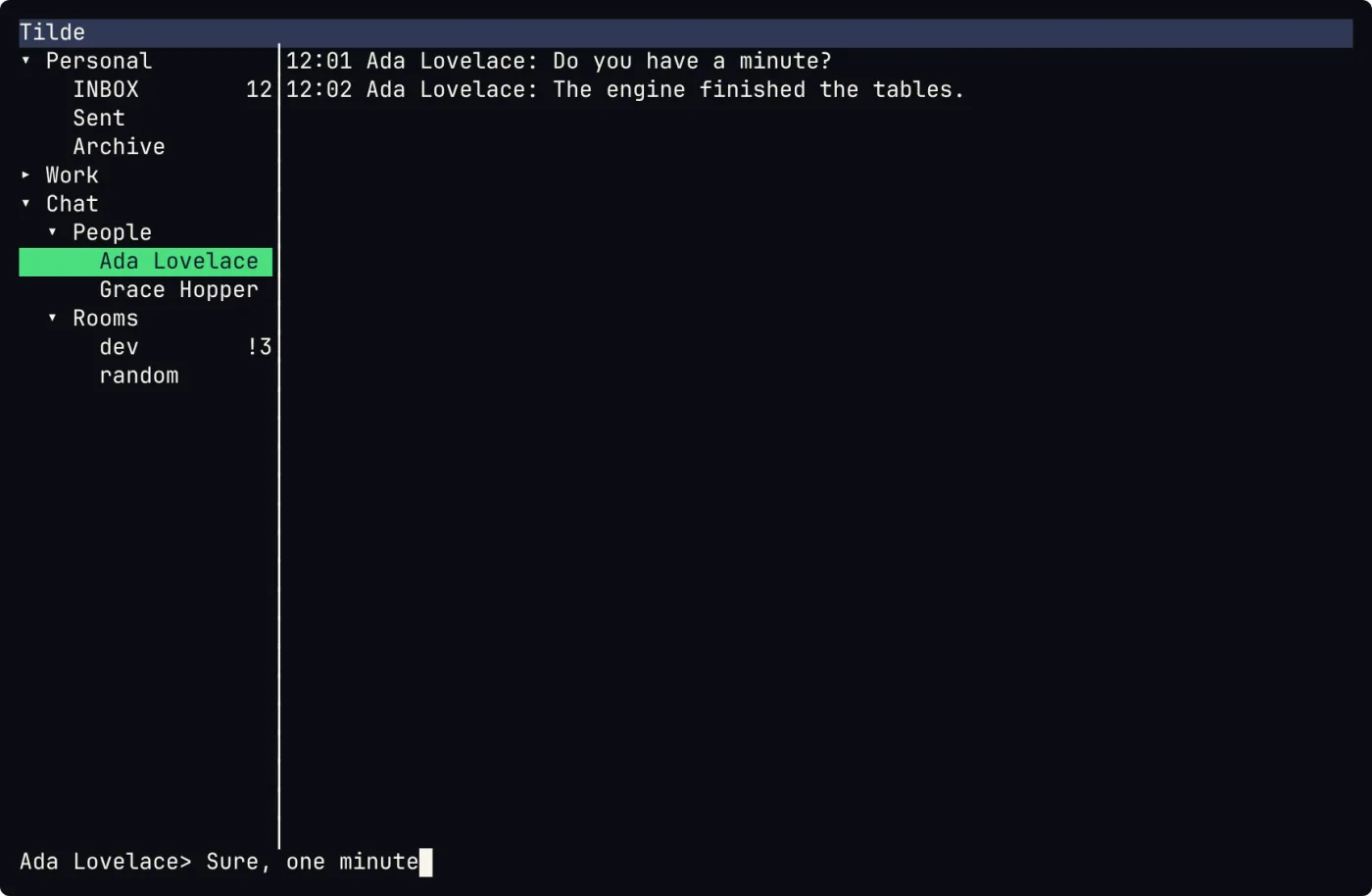
Mail folders and chat rooms in the same sidebar, a conversation open, an input line at the bottom.
Same keys, same Lua file for the bindings, same which-key panel. You move from a folder to a conversation with the same j and k.
What waits for me
The part I like most is small. IWhoNeedsMeService keeps one live list of what is waiting for me: the unread direct messages, the unread mentions and the unread mails of every account.
I wanted one place to look at, not three. And when I read or answer something on another device, the item clears here too: the Seen flag for mail, chat markers and message carbons for XMPP.
Bars you can configure
The top bar and the status line at the bottom are not fixed. Each one is a Lua function that you write, and it returns two lists of items, one for the left and one for the right:
bar.top(function(ctx)
  return {
    left = { { " Tilde", bold = true } },
    right = { { sys.date("ddd dd MMM  HH:mm") .. " ", fg = "accent" } },
  }
end)
The function gets ctx, a copy of the state of the screen: the place, the counts, the connection of the account, the unread chat messages, the key hints. Tilde writes a default bars.lua the first time and never touches it again, so it is yours to edit. A bar runs in the background, so the screen never waits for it, and on a narrow screen the items at the end are the first to go.
An item can be anything a script can compute. The example I like is the weather. A small Lua script, which Tilde does not install because it calls out to the internet, reads Open-Meteo (free, no key) with the http and json modules, and puts an icon, the city and the degrees at the right of the status line. In bars.lua it is two lines:
local weather = require("weather")
weather.setup{ city = "Firenze" }
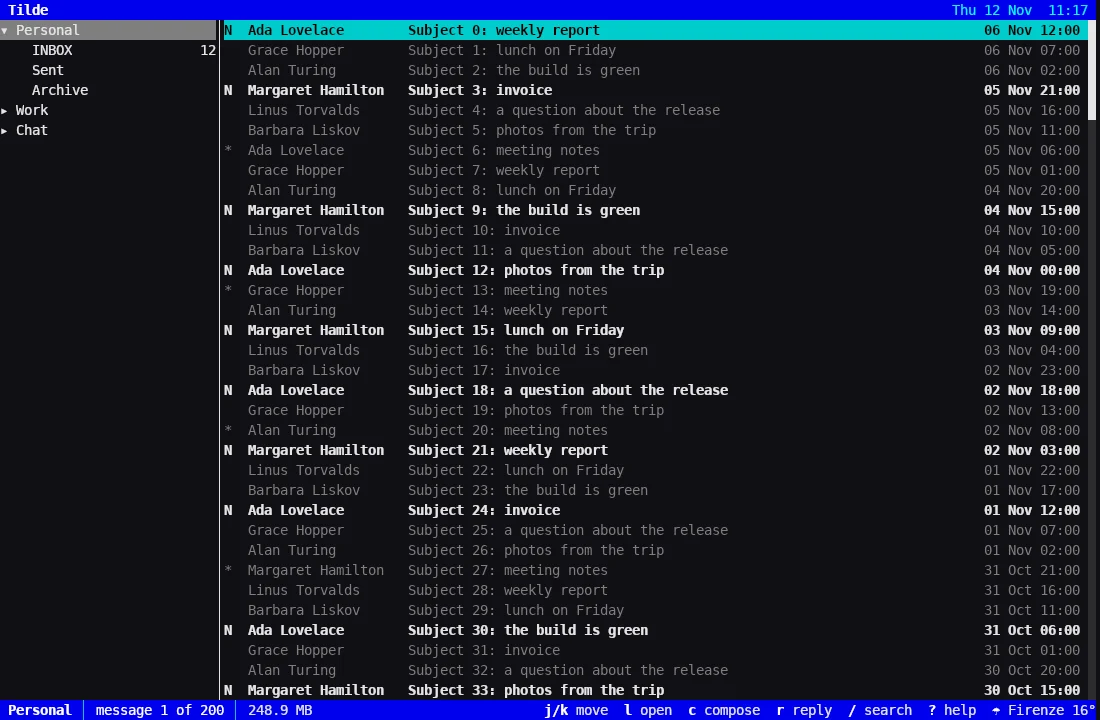
The top bar with the date and the time, and the status line with the weather of Firenze. Only the name of the city is sent to the service, to find its place.
The window: ttui
There is a second front end, and it is the part where I learned the most.
tt is the terminal interface. ttui is the same interface in a window, the way Neovide is nvim in a window. It is not a second program: it runs the same screens, keys, commands, themes and Lua. Only the drawing changes. I wanted smooth scrolling, a font I choose and true colours, and I wanted to learn Silk.NET and SkiaSharp.
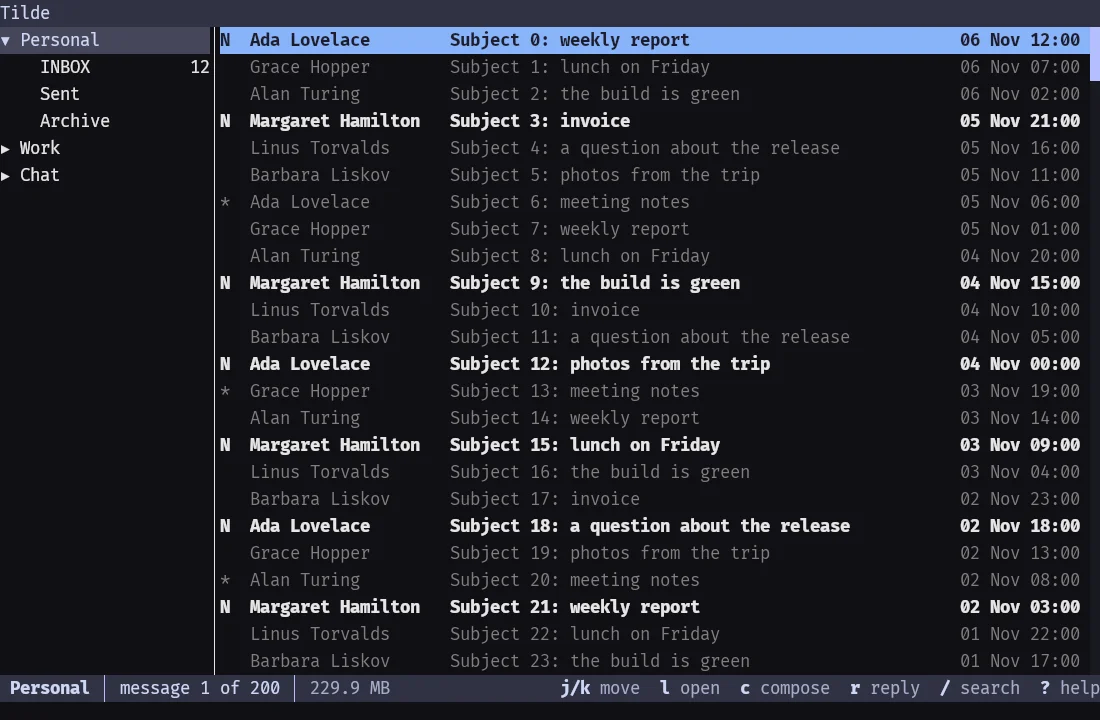
ttui --demo on Linux, with the font Fira Code and the theme catppuccin-mocha. Same screen as tt: a font and a theme are two lines in config.toml.
The trick is that tt already talks to the outside world through one small interface, ITerminal. In the terminal, a grid of cells is turned into ANSI codes. In ttui, the same grid is painted with Skia on the framebuffer of an OpenGL window made with Silk.NET and GLFW. To share everything above that line, the host of the interface (loop, screens, themes) moved into its own library used by both.
A few details I enjoyed:
- Box and block characters are drawn as rectangles, so that a border never has gaps between cells.
- A character that the font lacks is drawn with another font of the system.
- The window repaints only when the cells, the theme or the size changed.
- The tests paint on a bitmap in memory, so they need no GPU.
And what it cannot do yet: no images in mail, no HTML drawn as HTML, no proportional fonts. It is built for Linux, macOS and Windows, but I have tried it only on Linux. On macOS GLFW wants the main thread, and ttui does not use it, so expect that to need work.
What I kept from tmail
The ideas that worked: keys that are a Lua file you can read and edit, the which-key panel, GPG through your own gpg, and a small interface that does not make you reach for the mouse. The code is new.
How I wrote it
I did not write Tilde alone. I worked with AI agents for the plans, the code, the tests and the documentation, and a second agent reviewed every branch before I merged it.
What is mine: the idea, the architecture (contracts, plugins, no magic), every decision about what goes in and what stays out, and the core, Tilde.Core, which I wrote by hand: accounts, configuration, the event bus and the plugin loader.
This is not what I told you about tmail, where the code was mine. I would rather say it than let you guess it.
Where it is today
Honestly: a framework with a lot of plugins and a client that is growing. Releases are signed, there are packages for Debian, and a nightly build of the development branch. Version 0.7.0 came out on 11 November, and the mailing lists, with sidebar, join, leave and archive, arrived the same week.
The code is free software under the GPL-3.0-or-later at codeberg.org/squidd/Tilde, and the documentation is at squidd.codeberg.page/Tilde.
What comes next
The next step is the simplest and the hardest: I am going to use Tilde every day, as my default mail client, and see where it breaks. A tool you write for yourself only becomes real when you depend on it, and I expect the bugs to come from there, not from the tests. While I do that I want to make more themes: a theme is one small TOML file, and I would like Tilde to ship with a few good ones. The limits I know about are on the list too: ttui has only been tried on Linux, and a grid of cells cannot show images in mail or HTML drawn as HTML yet.
What I would like to hear from you
- Does mail and chat in one tree work for you, or do you want them apart?
- Would you use
ttui, or is the terminal enough? - What is missing from the tools you use every day?
Opinions, criticism and suggestions are welcome, and so is a healthy I think you are making a mistake. Write below, or open an issue on Codeberg.
Thank you for reading this far.